
You can check your solar battery from your phone. Learn what SOC, voltage and cycle count mean in your battery app, how to check battery health, and what to do when the app shows no data.
Most modern home batteries connect to a smartphone app over WiFi or Bluetooth, and the app shows state of charge, voltage, current and cycle count. On our 48V/51.2V LiFePO4 home battery series, the 15kWh model comes with built-in Bluetooth and WiFi, so you can view real-time voltage, current, SOC and cycle count from anywhere through a dedicated app. No app handy? The 5kWh model shows everything on a touchscreen display and the 10kWh model on a clear LED power indicator. This guide explains what each reading means, how to check battery health, and how to fix the most common monitoring problems.
How Do I Check the Health of My Solar Battery?
Health is not the same as charge. Charge tells you how full the battery is right now. Health tells you how much capacity the battery has left compared to when it was new.
Open your battery app and look for two things: state of health (SoH) and cycle count. A healthy LiFePO4 battery shows an SoH near 100% early in its life, then capacity fades gradually as cycles accumulate. On our datasheets this is expressed directly: the series is rated for 6,000+ full cycles at 80% capacity retention, with a 15-year design life — so after heavy daily cycling you still keep four-fifths of the original capacity.
You can also do a simple offline check: fully charge the battery, discharge it through a known load, and compare the delivered kWh against the rated capacity. If a 10kWh battery delivers only 8kWh, its health has dropped to about 80%. Most owners never need this test — the app numbers are enough.
How Do I Read My Solar Battery App?
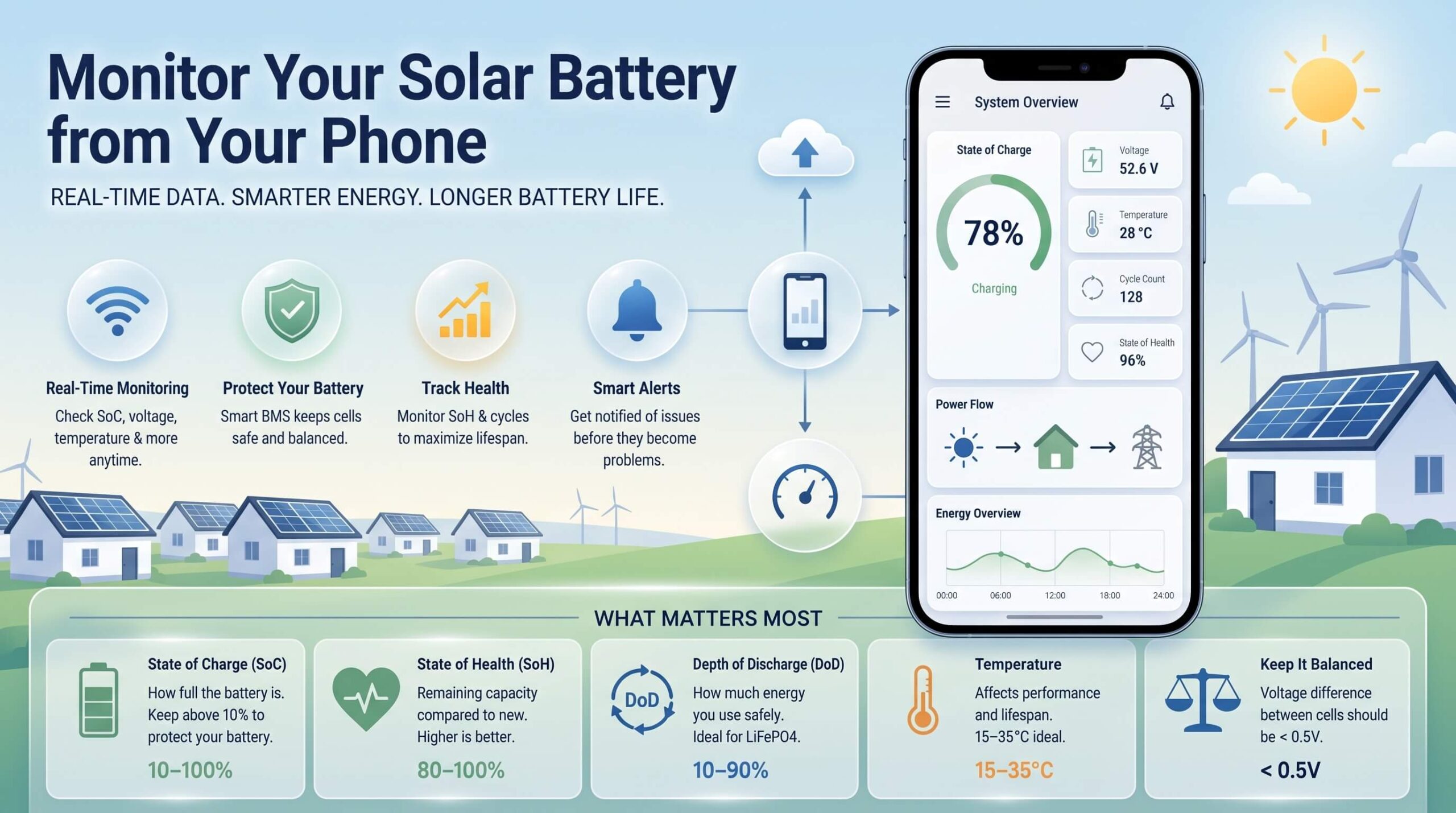
Battery apps show the same core metrics under different names. Here is what each one actually means, with the normal range for a 51.2V LiFePO4 pack like ours:
| Metric | What it tells you | Normal range (LiFePO4) |
| State of charge (SoC) | How full the battery is | 10–100% |
| Voltage | Pack voltage, rises as it charges | 40.0–58.4V for a 51.2V pack |
| Current | Charge/discharge rate right now | Within rated limits |
| Cycle count | Full charge/discharge pairs completed | — |
| Temperature | Cell heat, affects lifespan | Charge 0–45°C, discharge -20–55°C |
Two readings deserve special attention. First, SoC below about 10% means the battery is nearly empty and the BMS may cut power to protect the cells. LiFePO4 has an exceptionally flat discharge voltage curve, so terminal voltage alone cannot reliably judge remaining charge — that is why the app relies on coulomb counting, which accumulates small errors over weeks and months. Symptoms include the battery showing 100% much faster than normal, or cutting out while the app still reports 10–20%. A full, uninterrupted charge cycle resets this drift. For a deeper look, see our analysis of lithium battery SOC measurement methods.
Second, voltage spread between cells. On a healthy pack, cell-to-cell voltage should stay tightly grouped — spread consistently above roughly 50mV signals the balancing circuitry is working hard, and much larger gaps point to cells that need inspection. A smart BMS handles the balancing automatically.
What Is the Best Way to Monitor a Solar Battery?
You have three options, from easiest to most technical:
- Brand app over WiFi/Bluetooth — the default for most home systems. Free, no extra hardware, and it shows everything you need. This is what most owners should use: our 15kWh model streams real-time voltage, current, SOC and cycle count to your phone over Bluetooth and WiFi.
- On-unit display — no app required. The 5kWh model has a touchscreen display where you can check and set battery parameters directly, and the 10kWh model shows remaining charge on a clear LED power indicator (10–100%).
- Standalone monitor with a shunt — a small device wired into the battery circuit that measures current directly and gives accurate SoC, even for DIY systems with no smart battery. The right choice when your battery has no built-in communication port.
There is no single best option for everyone. App monitoring is fine for most homeowners; a shunt-based monitor is for DIY or off-grid setups where you want data you can trust independently of the manufacturer.
How Does WiFi and Bluetooth Monitoring Work?
The battery sends data through its built-in BMS — the board that protects the cells and tracks voltage, current and temperature around the clock. The BMS passes that data to a WiFi or Bluetooth module, which sends it to your phone or the cloud.
- Bluetooth works within about 10 meters — great for a quick check while standing next to the battery.
- WiFi keeps the battery visible from anywhere, as long as your router is on, and enables cloud features like remote alerts.
Beyond display, the BMS is the safety backbone: our packs pair a built-in 16S 100A/200A BMS with a circuit breaker for double protection against overcharge, overdischarge, overcurrent and short circuit, while RS485/CAN communication links the battery to mainstream hybrid inverters. For a full picture of these protection functions, see our guide on BMS and energy-storage safety design.
My Solar Battery Monitor Shows No Data — What Now?
- Restart the app — close it fully and reopen. This fixes most display glitches.
- Check the battery’s WiFi connection — if the router moved, had an outage, or the password changed, the battery may be offline. Reconnect it through the app’s setup menu.
- Check Bluetooth distance — step within about 10 meters of the battery if you use Bluetooth mode.
- Check the wiring — for DIY shunt monitors, a loose terminal gives zero readings. Tighten and retest.
- Reboot the battery — switch it off through the BMS, wait 30 seconds, and power it back on. This clears most communication errors.
If the app still shows nothing, contact the battery maker. A dead display is usually a module or firmware fault, not a cell problem — and it is almost always covered by warranty.
Q1. Do I need an app to monitor my solar battery?
No. The 10kWh model has an LED power indicator and the 5kWh model a touchscreen display; the 15kWh model additionally offers Bluetooth/WiFi app monitoring for remote data.
Q2. Can I monitor two solar batteries at once?
Yes. Up to 15 units can be connected in parallel, and with RS485/CAN communication the app or inverter sees the whole bank’s combined SOC, voltage and power — some views show each unit separately.
Q3. Does monitoring drain my solar battery?
No. The monitor and WiFi module draw only a few watts at most — you will not notice it on the SoC reading.
Q4. How often should I check my solar battery?
Once a week is enough for a healthy system — glance at SoC, voltage and any error alerts. Every three months, run one full, uninterrupted charge cycle to keep the SoC estimate calibrated.
Q5. Is there a free app that monitors any solar battery?
No universal app covers every brand. Use your manufacturer’s free app (it fits your hardware best) or, for mixed-brand DIY setups, local open-source monitoring tools on a small computer.
Monitoring your solar battery is the easiest part of owning one. Whether you prefer a phone app, a touchscreen on the unit, or an LED glance, modern LiFePO4 systems put charge, voltage and cycle data within reach — while the BMS quietly handles safety in the background. Understand the readings, calibrate once in a while, and your battery will return the favor with years of reliable service.